Quick Start
Prerequisites
- Python 3.11+ (3.12 recommended)
- uv for backend dependency management
- pnpm for the web and docs apps
- Docker for the full Compose stack and local Postgres-backed persistence
- An OpenAI API key for LLM-backed runs and OpenAI Realtime voice
Deterministic TUI sessions and many local checks work without external model keys.
Install
git clone https://github.com/whanyu1212/OpenCouch.git
cd OpenCouch
pnpm install
cd apps/backend
uv sync
Environment
OpenCouch loads local environment files from the repo root and
apps/backend (.env, then .env.local). Real model runs need an
OpenAI API key:
# Defaults to openai when unset.
LLM_PROVIDER=openai
OPENAI_API_KEY=...
Run the TUI
The Textual TUI is the local dogfood surface for the text agent. It
ships with switchable Dogfood, Debug, Chat, and Memory views;
Tab and Shift+Tab cycle them, and Ctrl+1–Ctrl+4 jump directly.
It starts in light mode by default — use --theme dark or press
Ctrl+Y inside the TUI to switch.
Run the ./scripts/text_tui.sh commands below from the repository
root. If you're still in apps/backend from the install step, cd ../.. first.
Deterministic mode
No LLM calls, in-memory only. Good for verifying TUI rendering, slash
commands, and local persistence plumbing. User turns return a labeled
deterministic smoke response; switch to auto or hybrid for real
crisis classification and therapeutic generation.
./scripts/text_tui.sh \
  --mode deterministic \
  --memory-mode guest \
  --view dogfood \
  --thread-id scratch
Full mode with persistent memory
Real LLM with durable configured storage. Facts, session arcs, and style rules survive restart; Postgres is the only supported durable long-term memory backend.
./scripts/text_tui.sh \
  --mode auto \
  --memory-mode persistent \
  --user-id alice \
  --thread-id alice-s1
Reuse the same --user-id and --thread-id to resume a conversation.
Use the same --user-id with a new --thread-id to start a fresh
session that still has access to the user's long-term memory.
You can also invoke the TUI directly from apps/backend without the
script wrapper:
cd apps/backend
.venv/bin/python -m opencouch_tui \
  --mode auto \
  --memory-mode persistent \
  --user-id alice \
  --thread-id alice-s1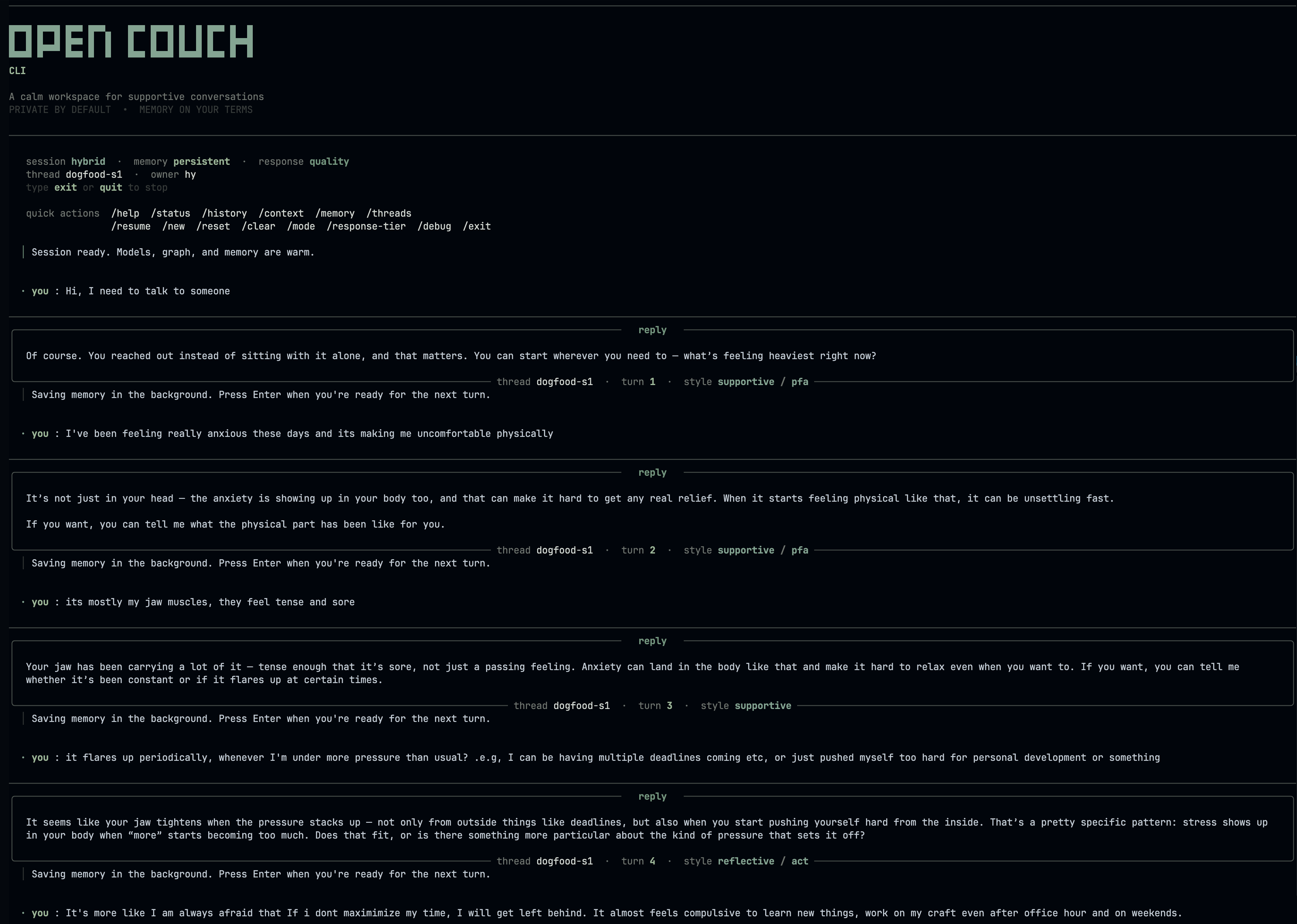
Run the Web App
For day-to-day web development, start Postgres + the backend API with Compose and run the frontend locally for hot reload:
./scripts/dev_api_stack.shcd apps/web
NEXT_PUBLIC_API_URL=http://localhost:8080/api pnpm devOpen http://localhost:3000. The Compose API is exposed at
http://localhost:8080/api.
The web service remains available in Compose but is profile-gated.
Use it when you want a production-built web smoke test instead of
Next.js hot reload:
./scripts/dev_full_stack.sh
# or: docker compose --profile web up
If you run the backend directly from apps/backend, use port 8000.
The web app defaults to http://localhost:8000/api, so this path does
not need NEXT_PUBLIC_API_URL.
cd apps/backend
.venv/bin/python -m uvicorn main:app --port 8000 --reload
The web app is the primary product UI — streaming chat, the memory manager, and OpenAI Realtime voice all run there. The TUI is the deterministic-mode dogfood path: it needs no provider key and is handy for quick local checks and scripted runs.
Voice Mode
Voice mode runs from the web app at /voice using OpenAI Realtime
WebRTC. Start the backend and web app, complete setup, then open the
Voice tab. Persistent sessions reuse the same memory owner as text;
incognito voice sessions do not write durable memory.
Slash Commands
Once inside the TUI:
Session & Display
| Command | What it does |
|---|---|
/help | List all commands |
/status | Thread id, response tier, turn count, and active response LLM |
/doctor [verbose] | Check runtime readiness for the current session |
/history [n] | Recent messages with response-style metadata |
/context | Session context snapshot |
/summary [short|full] | Generate a recap of the current session |
/search <history|memory|all> <query> | Search the active transcript, stored memory, or both |
/export <md|json|txt> [filename] | Export the current session transcript to a file |
/keys | Show keyboard shortcuts and prompt tips |
/ui <compact|full> | Switch toolbar density |
/theme <mono|contrast|calm> | Switch prompt color theme |
/clear | Clear terminal and redraw header |
/reset | Clear the conversation history |
/end | Summarize session and save session-end memory |
/exit | End session with save prompt |
Memory
| Command | What it does |
|---|---|
/memory status | Per-namespace counts, recall toggle |
/memory list [facts|sessions|rules] | Semantic facts, episodic arcs, or procedural rules |
/memory recall [on|off] | Toggle proactive recall; omit on/off to show current state |
/memory forget <fact|session|rule> <n> | Delete one record by index |
/memory clear <facts|sessions|rules|all> | Wipe a namespace |
/memory purge-crisis [days] | Retention-purge crisis log |
Threads
| Command | What it does |
|---|---|
/threads [n] | List persisted thread ids (default: 12) |
/resume <thread-id> | Switch to an existing thread |
/new [thread-id] | Start a fresh thread |
Runtime
| Command | What it does |
|---|---|
/mode <deterministic|hybrid|auto> | Switch LLM resolution mode |
/response-tier <fast|quality> | Switch response quality/latency tradeoff |
/verbosity <compact|verbose> | Switch turn observability detail |
/trace <on|off|once> | Show or hide routing trace overlay |
/debug state | Raw developer/debug runtime state as JSON |
Aliases
| Alias | Expands to |
|---|---|
/h | /help |
/s | /status |
/m | /memory |
/k | /keys |
/t | /theme |
/q | /quit |
/c | /clear |
The completion menu shows recently used commands at the top (marked with ↻) and suggests corrections for typos.
Tests and Evals
End users do not need to run these checks.
Run backend tests from apps/backend:
cd apps/backend
.venv/bin/python -m pytest tests/unit tests/integration
Run frontend checks from apps/web:
cd apps/web
pnpm lint
pnpm build
Use backend tests and targeted live-provider tests as the regression checks.
Trace Observability
To enable Opik tracing for local text runs, add this to .env
before starting the TUI or API:
OPIK_API_KEY=...
OPIK_WORKSPACE=...
OPIK_PROJECT_NAME=opencouch-dev
Opik is the trace surface for runtime execution, run filtering, and experiment review.